First make sure Hotkeys is ticked, 360 isn’t blocking them and the numpad is unlocked. If you trigger them while typing, use key combinations; if they clash with other apps, switch the hotkey mode.
No hotkeys respond at all
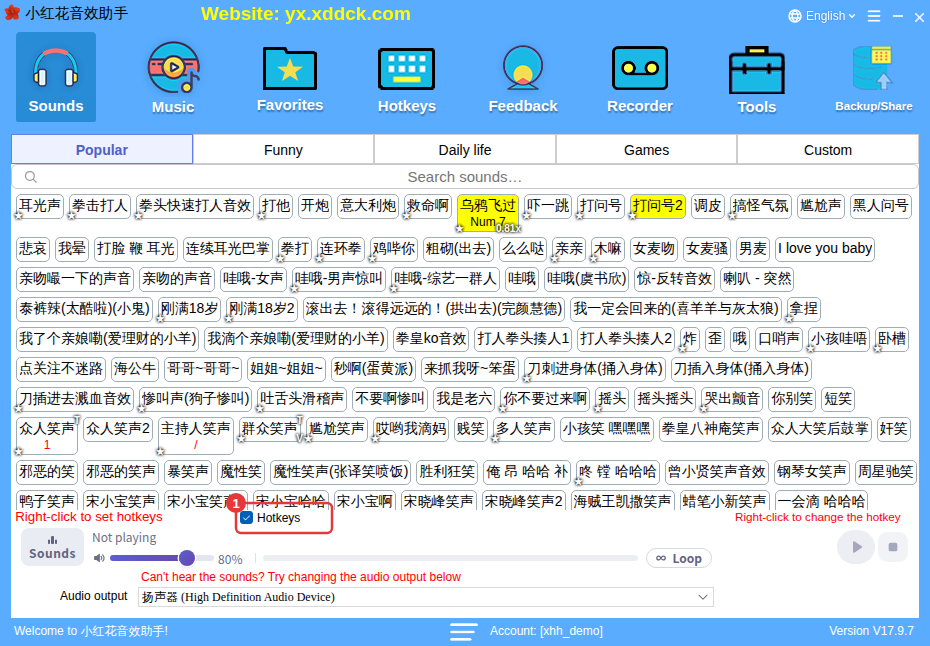
- Check that Hotkeys at the top left of the player is ticked (①).
- If 360 Total Security is installed, turn it off and try again.
- On the Hotkeys page, check which hotkey category you’re using — each category has its own hotkeys. See Hotkey management and keys in use.
Numpad keys don’t respond
Press NumLock on your keyboard to unlock the numpad. See Numpad hotkeys don’t work.
Hotkeys trigger while typing
Untick Hotkeys for the moment, or turn them off in the floating window; you can also give the hotkeys switch a function hotkey to toggle them with one key. In the long run, use key combinations such as Ctrl+1.
The key’s normal action also fires, or it clashes with another app
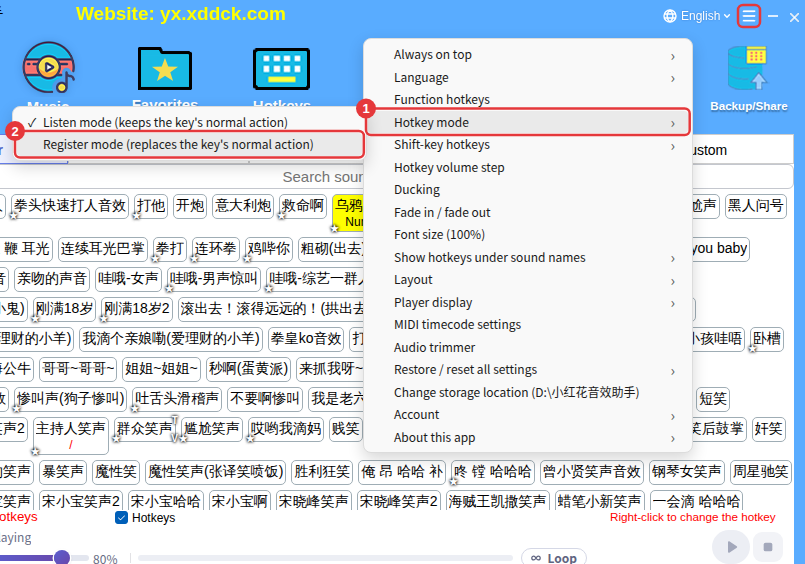
Under ≡ in the top-right corner → Hotkey mode, try Register mode (replaces the key’s normal action). See Hotkey mode and Shift-key hotkeys. Before choosing keys, check the Hotkeys in use keyboard to see which keys other apps already use.