
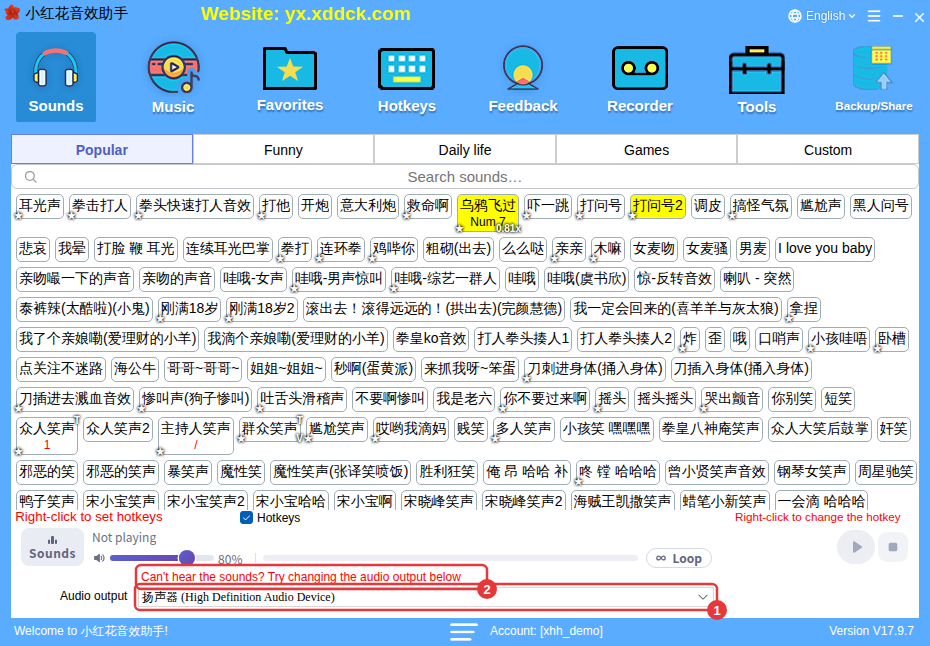
Usually the output device has a problem, is being used exclusively by another app, or no sound card is detected. Switch to a working device under Audio output and try again.
Common causes
- The output device has a problem;
- Another app is using the output device exclusively;
- No output device is detected at all (the sound card isn’t connected properly or its driver has a problem).
How to fix it
Under Audio output at the bottom of the main window, switch to a working output device (for example your external sound card’s channel) and click a sound to test it.
What the error codes mean
| Error code | Meaning |
|---|---|
| 1 | Memory error |
| 8 | Channel problem, or no output device detected |
| 18 | No free channel available |
| 23 | Invalid device number |
| 42 | Speaker not available |
| 46 | Device busy |
| -1 | Other unknown problem |
