
Deleted sounds or categories by mistake, or messed up your settings? The app saves restore points automatically, so you can go back to an earlier time.
Restore all settings
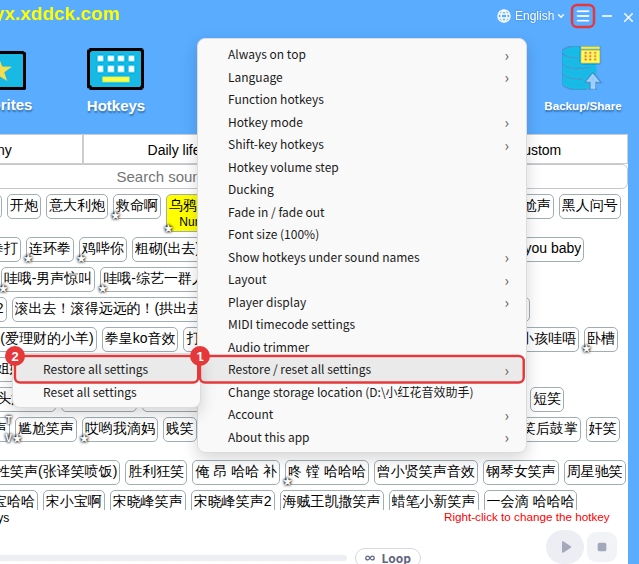
- Click ≡ in the top-right corner → Restore / reset all settings → Restore all settings.
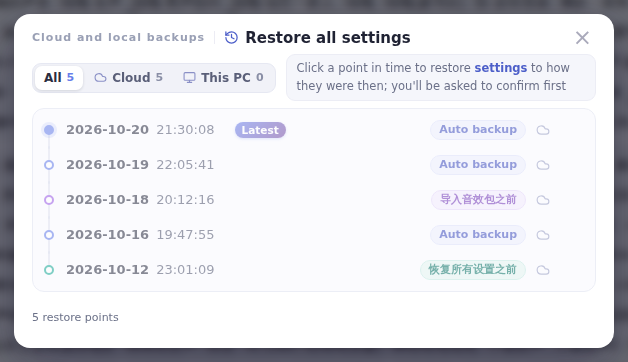
- The window lists cloud and local restore points, each with its time and type: auto backup (saved automatically the first time you sign in each day), before a reset, before a restore, and before importing a sound pack.
- Choose the point to go back to and confirm. After a successful restore the app restarts automatically.
Reset all settings
≡ → Restore / reset all settings → Reset all settings returns your account to how it was right after you signed up.
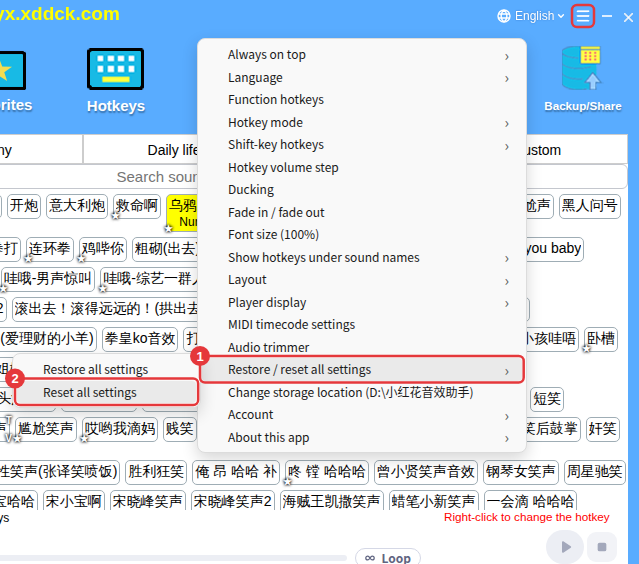
Be carefulResetting deletes all custom sounds, favorites, hotkeys and other settings; it takes effect after you sign in again. A restore point is saved automatically before the reset, so you can use Restore all settings to get everything back if you change your mind.
