
Can’t find a sound you want, have a suggestion, or found a problem? Send feedback right in the app and see the official replies.
Send feedback
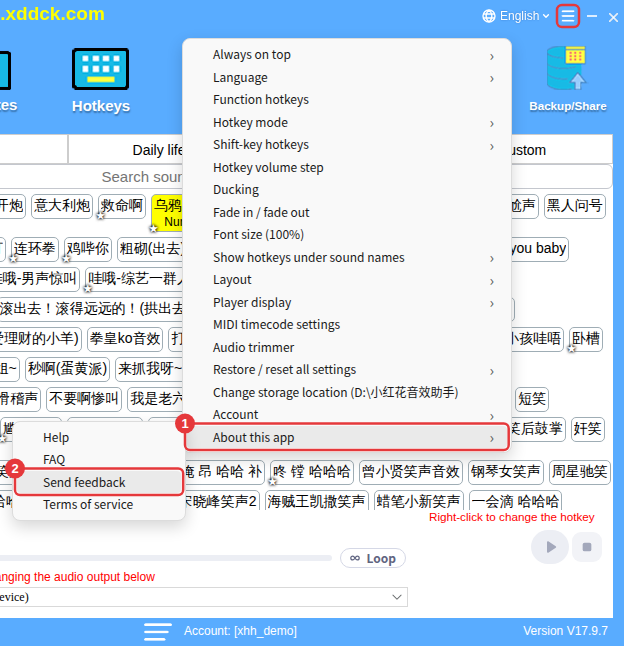
- Click Feedback on the toolbar (or ≡ in the top-right corner → About this app → Send feedback).
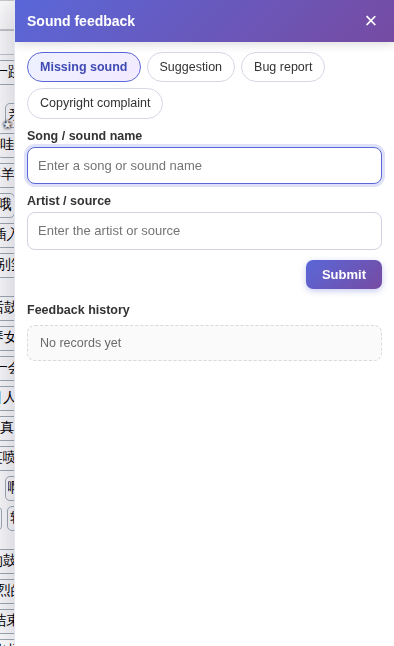
- At the top of the panel on the right, choose a type: Missing sound, Suggestion, Bug report or Copyright complaint.
- Fill it in. For a missing sound, enter the song / sound name and the artist / source — at least 2 characters each.
- Click Submit. Each message can be up to 1000 characters, and you can send up to 50 a day.
See replies
Feedback history at the bottom of the panel lists what you’ve sent and the official replies, with the dates.
Copyright complaintsChoose Copyright complaint and follow the instructions on the page to email us. Valid complaints are reviewed within 72 hours.
