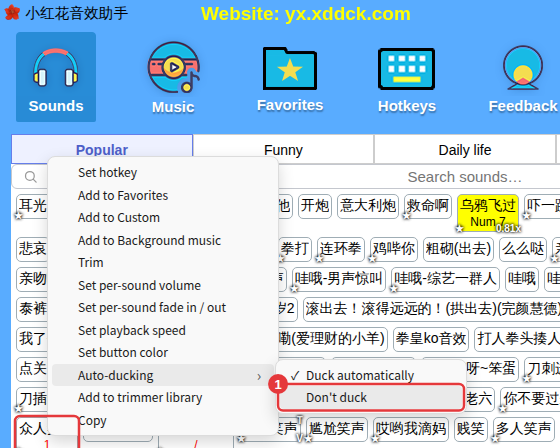
If it stops after one song, the play order is set to Play once. If it gets quieter when you click a sound, auto-ducking is on — you can turn it off for one sound or for all of them.
Stops after one song: check the play order
With the play order set to Play once, background music stops after the current song. Click the play order button on the Music row of the player (②) and switch to Repeat all, Shuffle or Repeat one.

Music gets quieter when a sound plays: that’s auto-ducking
With ducking for sounds turned on, playing a sound lowers the background music automatically so the sound is clearer. If you don’t want it:
- For one sound only: right-click it → Auto-ducking → Don’t duck.
- For all sounds: ≡ in the top-right corner → Ducking, and turn off ducking for sounds.