
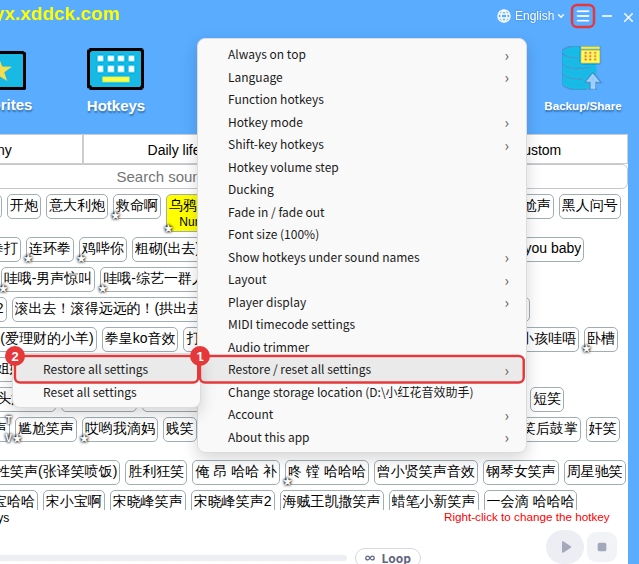
Go to ≡ in the top-right corner → Restore / reset all settings → Restore all settings and choose a restore point from before the deletion. The app restarts automatically afterwards.
How to get them back
- Click ≡ in the top-right corner → Restore / reset all settings → Restore all settings.
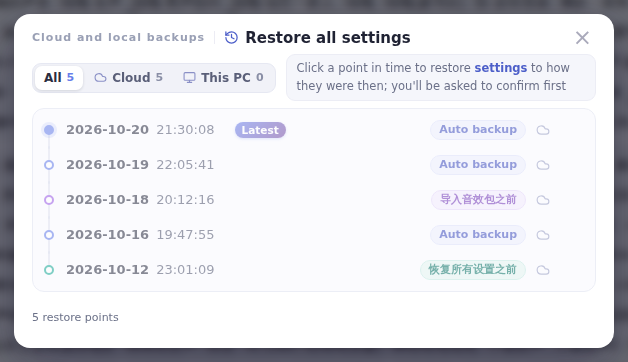
- Choose a point from before the deletion and confirm; after a successful restore the app restarts automatically.
Which points can I go back to
The list has cloud and local restore points: auto backups (saved the first time you sign in each day), and points saved before a reset, before a restore and before importing a sound pack. Choose the latest one from before the deletion.
NoteThis restores all settings: other changes made after the chosen point also go back to how they were. If you’re unsure, export a sound pack with Backup/Share first. A restore point is also saved automatically before restoring, so you can undo it if you pick the wrong one.
