
We recommend linking an email address to every account: if you forget your password you can reset it with an email verification code. Accounts without a linked email can’t recover their password on their own.
Link an email address
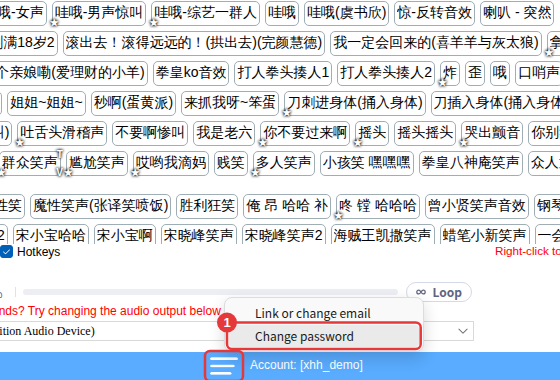
- Click ≡ in the top-right corner → Account → Link or change email (or use ≡ at the bottom of the window).
- On the link email page, enter your email address and click to get a verification code.
- Check your inbox for the code, enter it, and click Done.
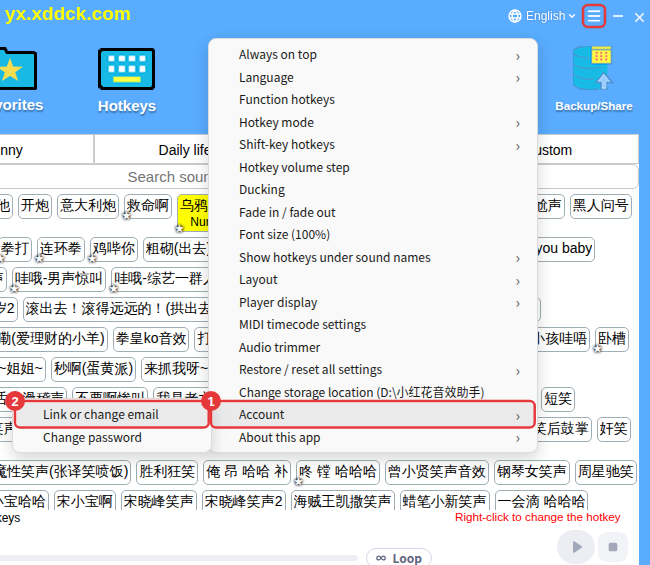
If an email is already linked, this option lets you unlink it — which also needs a verification code. An account without a linked email is at risk, so unlinking isn’t recommended.
Change your password
Click Account → Change password and enter your account, old password and the new password twice. Change password at the bottom-left of the sign-in window opens it too.
Forgot your password
Click Forgot password? in the sign-in window and reset it with a code sent to your linked email. See Forgot password.
Not getting the code?See No email verification code.
