
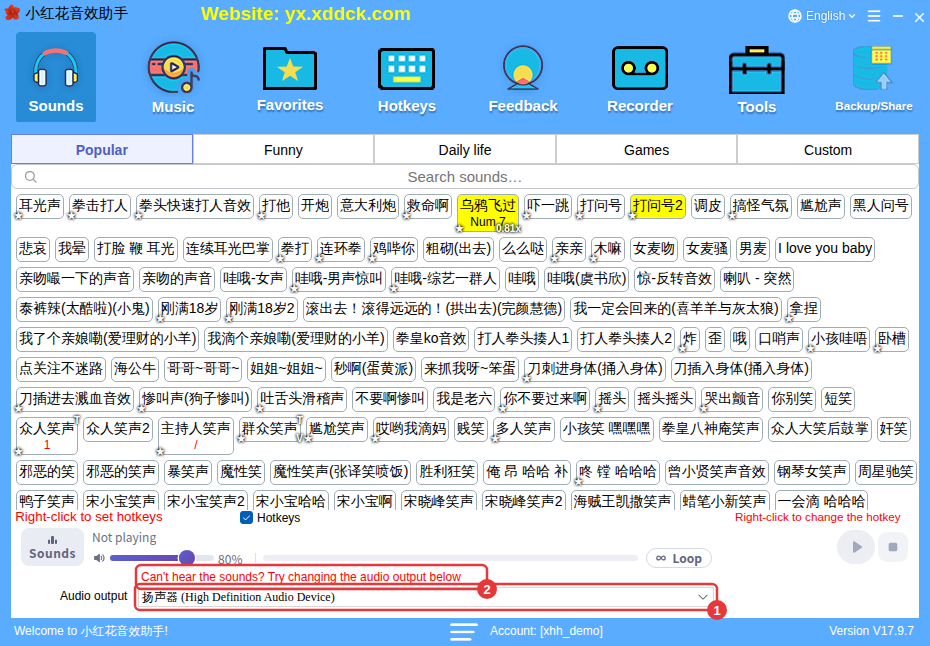
Which device your sounds come out of is set by Audio output at the bottom of the main window. If viewers can’t hear your sounds — or you can’t — check this first.
How to set it
- Find the Audio output drop-down at the bottom of the main window (①). The red text above it (②), “Can’t hear the sounds? Try changing the audio output below”, is a reminder about this.
- Open the drop-down and choose the device your streaming software or sound card is using.
- Click a sound to test it. No sound? Try the next device until you hear it.
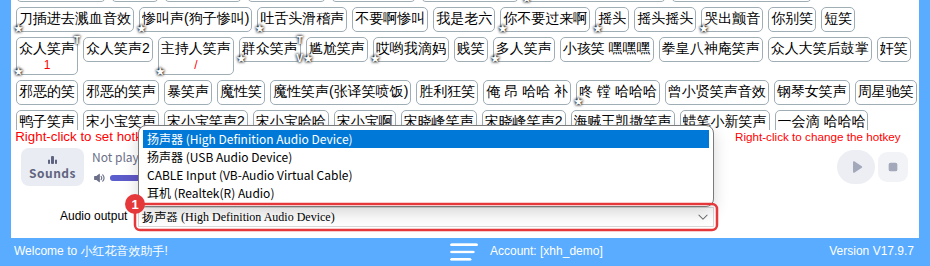
Which one to choose
- Streaming from a PC: the PC’s built-in sound card is enough; choose the device your streaming software captures (usually the speakers or headphones you’re using).
- With an external sound card: choose the external sound card’s output device, and your sounds go to the stream together with your voice.
- Streaming from a phone, sounds on the PC: use an external sound card to send the PC’s audio to the phone, or play the sounds through speakers.
Still no sound?See No sound or sound is quiet and Audio engine failed to start.
